


Git is a system that records every change to your code. Each saved change is called a commit, and you can look back at any commit to see what changed and when. If a new update breaks your site, Git lets you return to the version that worked.
cPanel includes a Git Version Control tool in the Files group. It gives you a simple way to create repositories and copy them from other places, such as GitHub. Keep in mind that the tool covers the basics only, so some tasks still need command-line access.
Check That the Tool Is Available
Open the Files group on your home screen. If you do not see Git Version Control, your plan may not include it. Contact HoganHost support to confirm before you plan around it.
Create a New Repository
- Log in to cPanel.
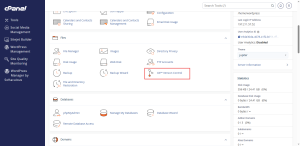
- In the Files group, click Git Version Control.
- Click Create.
- Turn off the Clone a Repository option.
- Enter a repository path and name. Keep it outside public_html, in a folder such as repositories.
- Click Create.
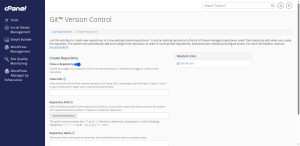
The path matters. Anything inside public_html can be seen by visitors, so keep your repository and its hidden Git folder outside it.
Clone an Existing Repository
If your code already lives on GitHub or another host, turn on Clone a Repository and paste the clone address into the Clone URL field. Set the path and name, then click Create. Private repositories usually need an SSH address and a key, which may require support to set up.
Deploy Your Code to the Site
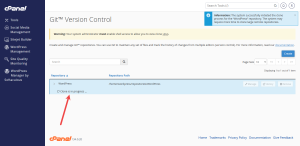
To publish your code to the live site, your repository can include a deployment file named .cpanel.yml. This file tells cPanel which files to copy into public_html each time you deploy. Pull the latest changes first, then deploy from the Manage page for the repository.
Be careful with removal. Deleting a repository from the Git tool may also erase the folder it sits in. Check the path before you remove anything.
Working on a site that needs more control over its code? HoganHost’s VPS hosting gives you the command-line access that advanced Git work requires.