


A redirect sends visitors from one web address to another automatically. Someone who clicks an old link lands on the right page instead of an error. Redirects matter when you move pages, change a domain name, or switch a site to https.
Know the Two Redirect Types
Each redirect has a type, and the type tells search engines what kind of move happened.
- Permanent (301): the move is final. Use this for most jobs.
- Temporary (302): the old address should come back later. Use this only for short-term changes.
Open the Redirects Tool
- Log in to cPanel.
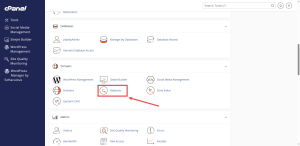
- In the Domains group, click Redirects.
If you cannot find Redirects there, open the Domains page, click Manage next to the domain, and look for the option to modify redirects.
Create a Redirect
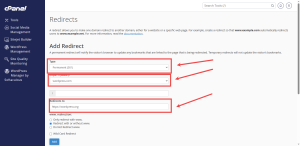
- Choose the redirect type. Pick Permanent (301) for most jobs.
- Choose the domain you are redirecting from.
- Leave the directory box empty to send the whole domain. Enter a folder name only if you want to redirect that one folder.
- Type the full new address, including its secure prefix.
- Choose whether visitors who type www. should also be redirected.
- Click the button that saves the redirect.
Avoid the Mistakes That Break Sites
Most broken redirects come from a few common errors.
- Never send a page back to itself. The visitor gets stuck in a loop.
- Do not create two redirects that point at each other. Each one sends the visitor back to the other.
- Make sure the destination address loads. Redirecting to a broken page only moves the problem.
- Use the secure prefix in the destination address when your site has an SSL certificate.
Test Every Redirect
- Open a private browser window so old saved pages do not interfere.
- Type the old address and press Enter.
- Confirm the new page loads and the address bar changes to the new one.
If something looks wrong, delete the redirect and try again. Changes take effect quickly, so you can fix mistakes without waiting long.
Moving your site to a new home at the same time? A cPanel shared hosting plan from HoganHost gives you a full cPanel account to set up your redirects.