


A subdomain is a name that sits under your main domain, like blog.yourbusiness.com.ng. It works as its own section of your site, often for a blog, an online shop, or a client portal. A subdomain uses space from your existing hosting account.
Open the Subdomain Tool
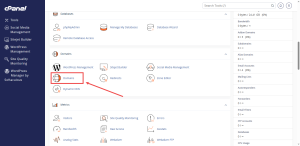
On the Jupiter home screen, subdomains are handled in the Domains group. Some accounts show a separate Subdomains icon in that group. Either way, the steps below are very similar.
- Log in to cPanel.
- In the Domains group, click Domains.
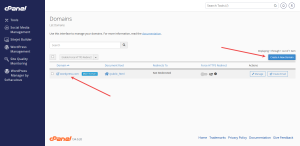
- Click Create A New Domain.
Enter the Subdomain Name
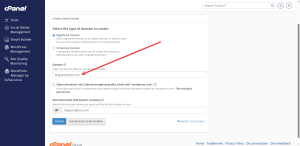
The form may ask you to choose the type of domain first. Pick the option for a subdomain, then follow these steps.
- Type the name you want in front of the dot, such as blog.
- Choose your main domain from the drop-down list.
- Check the document root. This is the folder that will hold the subdomain’s files. For a blog, a folder called blog keeps things tidy.
- Click the button that submits the form.
Use only letters, numbers, and hyphens in the name. Spaces and symbols will cause the form to reject it.
Manage an Existing Subdomain
Every subdomain appears in the domain list. Find it there and click Manage to see your options. From there, you can change its redirect or remove it.
Before you remove a subdomain, open its folder in File Manager and check what is inside. Save any files you still need. Removing a subdomain does not always remove its files, but it is better to be sure.
Fix a Subdomain That Will Not Load
If the subdomain shows an error, check three things.
- The folder name you chose exists and holds the site’s files.
- The subdomain was spelled correctly in the form.
- The DNS record for the subdomain is in place. The Day 3 guide on the Zone Editor shows you how to check this.
Planning a blog or a shop on a subdomain? A cPanel shared hosting plan from HoganHost gives you one account to manage all of your sites.