


You can send a perfectly written email and still have it land in the spam folder, or get rejected altogether. Receiving mail servers check whether each message really comes from your domain. Three DNS records help them decide. They are called SPF, DKIM, and DMARC.
Think of them as three different checks. SPF lists the servers allowed to send mail for your domain. DKIM attaches a digital signature to each message. DMARC tells receiving servers what to do when a message fails those checks.
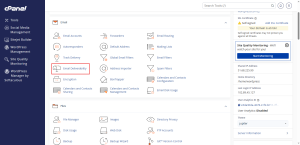
Open Email Deliverability
- Log in to cPanel.
- In the Email group, click Email Deliverability.
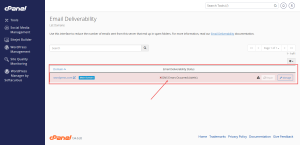
Read the Status Table
The table lists every domain on your account, with a status for each. A valid status means the records are in place. A warning or error means one or more records are missing or wrong.
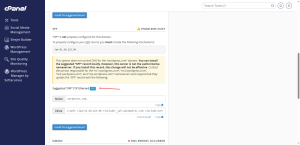
Fix the Records
- Click Manage next to the domain.
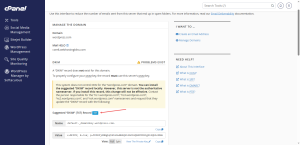
- Read the suggested records for SPF, DKIM, and DMARC. cPanel shows the exact name and value for each one.
- If you do not have a DKIM key yet, click Generate Local DKIM Key first.
- Copy each record into your domain’s DNS settings. You can do this in the Zone Editor if your domain’s DNS is managed by HoganHost, or at your domain registrar if it is not.
Copy the values from your own screen rather than from an example. Each domain has its own values.
Wait, Then Check Again
DNS changes take time to spread. Wait a few hours, then refresh the Email Deliverability page. The status should change to valid once the records are visible to the wider internet.
Start DMARC Gently
DMARC only works when SPF and DKIM are valid, so fix those first. cPanel suggests a starting DMARC policy that only monitors and reports failures without blocking anything. Keep that setting while you watch for problems. Move to a stricter policy later, once you are sure your legitimate mail passes every check.
If your domain has outside mail services, such as a bulk email tool, add them to the SPF record through its include list. Otherwise, their messages may fail the check.
A business email plan from HoganHost comes with a mail setup built for this kind of work, so you spend less time on the records.