


A busy inbox is hard to manage. Email filters look at each incoming message and act on it automatically. A filter can move newsletters into their own folder, flag invoices from a specific supplier, or discard obvious junk before it reaches you.
Filters work on rules you set. A rule might say, “If the subject contains invoice, move the message to the Billing folder.”
Know the Two Types
cPanel offers two places to set filters.
- Email Filters applies to one email account. Use it when only one inbox needs the rule.
- Global Email Filters applies to every account on your domain. Use it for spam rules that should apply everywhere.
Open Email Filters
- Log in to cPanel.
- In the Email group, click Email Filters.
- Choose the account the filter should apply to.
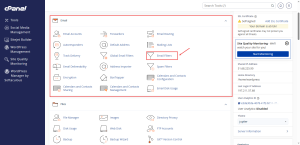
Create a Filter
- Click Create a New Filter.
- Type a filter name that describes what it does, such as Invoices to Billing.
- Choose the part of the message to check, such as the subject or the sender.
- Choose a condition, such as contains or equals, and type the text to match.
- Choose the action, such as moving the message to a folder.
- Click Create or Save.
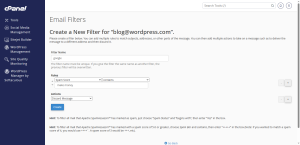
Use a folder you have already created, so the messages land somewhere you will look.
Order Matters
Filters are checked in the order they are listed, so the first matching rule may decide what happens to a message. Put the most specific rules first, and check the order on your screen after you add a new one.
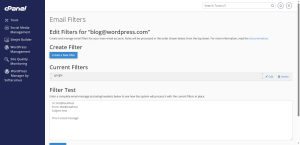
Test Before You Trust a Filter
Send a test message that matches the rule. Check that it lands where you expect. Be careful with the discard action. Messages that are discarded do not go to the folder or the inbox, so you cannot recover them from your mail client.
Need a business email setup that works well with your filters? See the HoganHost business email plan for the options that suit your team.